Two component tables: what needs attention, and what it all costs
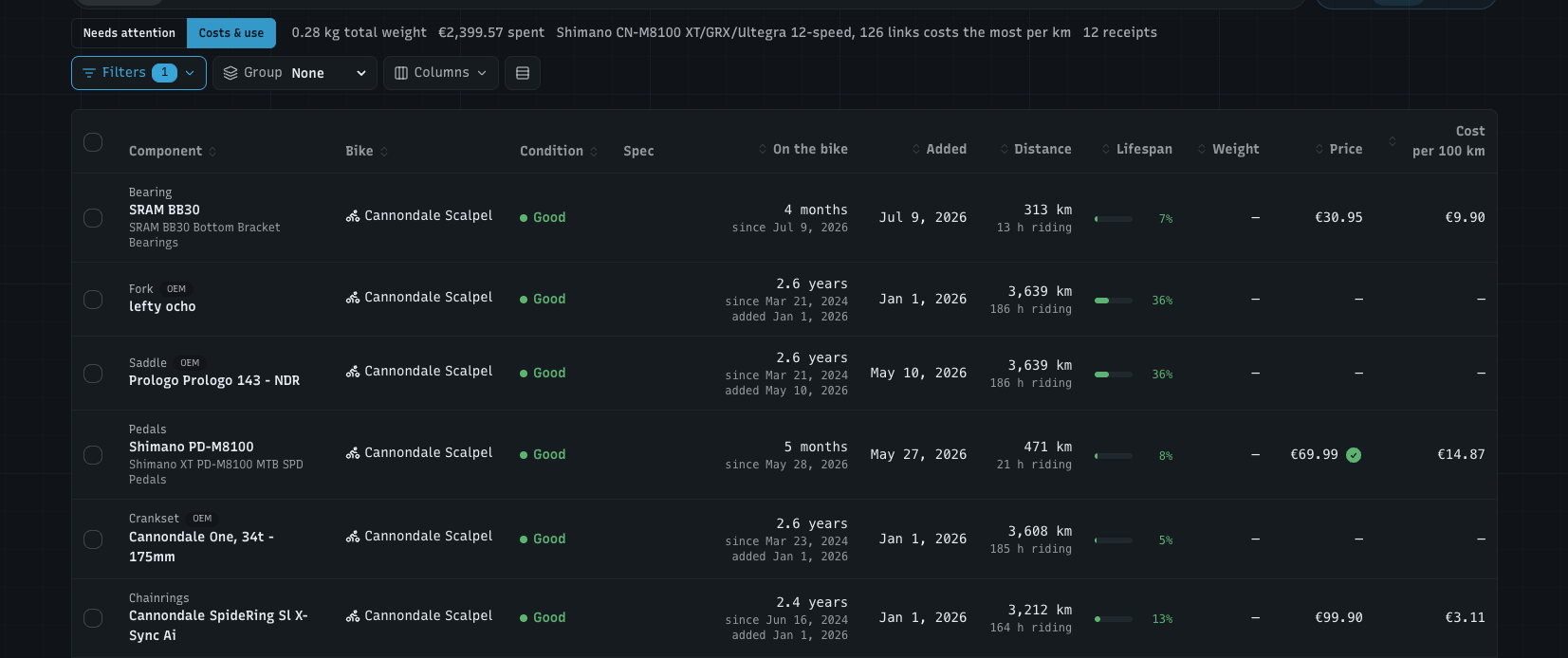
The Table view of your components was one fixed list. You open it for different reasons, though: sometimes to see what needs doing before the weekend, sometimes to see what a bike weighs or what a season of chains and tyres cost. So Table now has two tables, one for each question, and every column sorts.
You'll find it on Components and on a bike's Components tab: pick Table in the view switch. The other views stay as they were.
Needs attention: what do I need to do?
Condition per component: Good, Due soon or Due, the same as on the Condition tab. It's the worse of the component's wear and its next service
Wear with a bar and the distance left, or how far over it is
Next service with a bar and its countdown
Opens with the worst first, grouped by condition
The line above the table counts them: 4 due · 6 due soon · 16 good
Costs & use: what do I have, what has it done, what did it cost?
Spec: the component's key specs on one line
On the bike: how long it's been on the bike, with the install date under it. When you added it to WatchMy.bike later than you installed it, that date shows too, so a chain fitted in 2019 and added last month reads right
Distance, with the riding hours under it
Lifespan as a small bar
Weight and Price, with the receipt check on prices that have a receipt behind them
Cost per 100 km (per 100 mi with imperial units): what each component costs you for the distance it has done. Alloy and up
The line above the table adds it up: total weight, total spent, which component costs the most per 100 km, and how many receipts you have
The Storage, Retired and Wishlist tabs show Costs & use only: those components aren't on a bike, so there's nothing to rank by condition.
Sort, group and pick your columns
Click a column header to sort. The first click sorts numbers high to low and names A to Z, the second reverses it, the third goes back to the table's own order. Empty values always go last
Group by bike, category, condition, or not at all. Category and condition labels sit to the left of the table with alternating backgrounds, and each group shows its weight and price
Columns switches columns on and off. They always stay in the same order, whatever order you switch them on in. Added and Condition are there for Costs & use if you want them
Compact rows fits more on the screen
Filters (bike, category, OEM only / OEM & upgrades) now sit in the same row as the rest, with a count of what's on and Clear filters
On a phone, each component is a card, and a Sort menu replaces the column headers
WatchMy.bike remembers which table you used last, your columns and compact rows, on that browser. The first time, Table opens on Costs & use.
Smaller things
Table view on Components shows up to 200 components on one page, so sorting covers all of them instead of one page at a time
The receipt check now also shows in the Components list, not only on a component's own page