Changelog

Follow new updates and improvements to WatchMy.bike.

September 21st, 2026

user asked for it on the feedback board last week, and I wanted it myself: next to a component's installation history, the list of activities that actually made up its distance.

Every component now has an Activities tab. It lists each synced activity that counted towards that component, across every bike it has been on, newest first. A small header shows the totals so you can check they add up: number of activities, distance from activities, any baseline or manually entered distance, and the lifetime total.

It shows what each activity counted for. If a bike is set to leave indoor rides out of component wear, those rides still appear in the list, marked "0.0 km counted". The list and the total come from the same calculation, so what you see here is exactly what's in the component's distance.

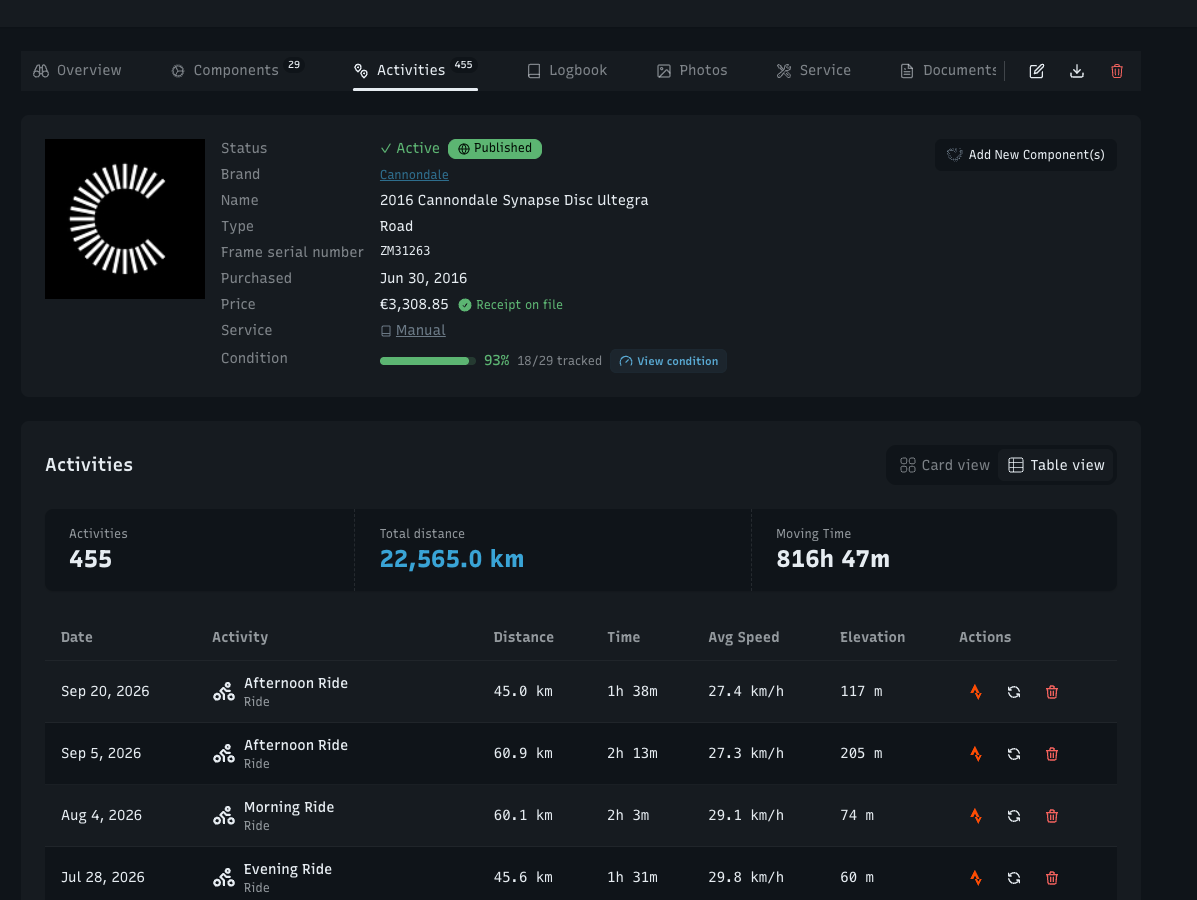
Bikes have an Activities tab too. The "Recent Activities" block used to sit at the bottom of the bike overview, below the stats and the components. It now has its own tab, right after Components, with the bike's activity count, total distance and moving time at the top and the full list below, paged. The tab count tells you how many activities the bike has without opening it.

Cards or table, your choice. Both tabs have the same Card view / Table view switch the component lists have, and they share the setting: pick Table once and every list follows. The table on the main Activities page also sits in its own card now, matching the rest.

Nothing about how distance is calculated has changed. This is a window onto it.

Write a comment...

September 19th, 2026

Improved

A user sent me a list of things that looked wrong in his logbook. Most of them turned out to have the same cause.

"Removed chain at 9,474 km" was the bike's odometer reading, not the chain's. That chain had done 379 km. Every removal entry in the logbook showed the bike's total distance instead of the distance the part itself covered — overstating it by nearly 7,000 km on average across the entries I corrected. It now shows what the part actually did: the same figure the component's own page and History tab have always shown.

It shows in your units too. Miles if that's your setting, instead of km for everybody.

Entries sit on the date the thing happened, not the day you typed it in. Fit a part in January, log it in July, and the entry used to say July — and correcting the install date afterwards didn't move it. It does now, and 232 entries have moved to the date they belong on.

Parts you deleted are out of the timeline. Deleting a component used to leave its "Installed" and "Removed" entries behind, linking to nothing. Deleting a part now takes its entries with it.

No more duplicate entries for a single install or removal. The database prevents a second copy rather than relying on the app not to write one.

Editing an entry no longer offers to change its date or which part it points at. Both come from the installation record, and the entry links you straight to it — so a wrong date is fixed once, in one place, and the logbook follows.

Manual notes you've written are untouched by all of this.

Write a comment...

September 17th, 2026

Improved

OEM parts. You can mark a component as original equipment — Came with the bike (OEM). OEM parts add no "Installed" entry to your logbook on the day you add them, because you didn't install them; replacing one later still does. They carry an OEM badge on the public bike page, the components list filters by OEM only or OEM & upgrades, and you can mark a whole selection at once. Importing from a spec sheet or the catalogue onto a bike creates the parts as OEM, with a checkbox on the confirm step if that's not what you meant.

Serial numbers. Bikes take a frame serial number and components take their own. Both are private to your account and never shown publicly — they're there for an insurance claim or a police report, not for the bike page.

Write a comment...

September 16th, 2026

Improved

A price you typed in is a claim. A price with the invoice behind it is a record — useful when you sell the bike, and useful when you're working out what a season actually cost.

  • Attach a receipt or invoice to a component, a bike, or a service record. One invoice can back several parts, so a single order covering four items gets uploaded once.

  • Backed prices show a receipt check — on your own component table, and on the public bike page with a tooltip explaining what it means.

  • The Documents overview shows your coverage: [n] of [n] priced items have a receipt.

  • The Excel export has a receipt column.

Write a comment...

September 16th, 2026

Improved

A published bike page can now double as a maintenance certificate for a buyer — the thing you send someone instead of saying "yes, it's been serviced".

  • Switch it on per bike with Show as certificate. It's off by default and it's yours to enable; nothing becomes public that wasn't already.

  • The Certified badge only appears when the record backs it up. Four rules: the bike page is published, mileage comes from Strava, at least one component has an install date, and at least one service is logged. Miss one and the page shows the plain profile, with a link to fix what's missing.

  • When it passes, the page reads Certified · mileage from Strava since [date] · [n] services logged, and the seal is stamped on the hero photo.

  • There's a print stylesheet, so it prints as a clean document rather than a screenshot of a web page.

  • Certified bikes carry the badge through to your public profile.

Write a comment...

September 14th, 2026

Improved

Power-meter pedals, a computer, lights, a wheelset. Plenty of parts move between bikes every ride, and until now each move needed a transfer — so most people didn't bother and the distance landed on one bike only.

Use one part on several bikes. On a component's page, Add to another bike puts it on a second or third bike while it stays on the first. Its lifetime distance now counts rides from every bike it's on, and a ride is only ever counted once. Transfer still exists for a true move. Removing the part asks which bike you mean. Service intervals stay with the part, not the bike — one reminder, whichever bike you rode.

Edit or delete a past installation. A component's History tab lists every period it spent on a bike, with dates and the distance ridden in that period. Past periods now have Edit record and Delete record, so a wrong date or a double entry is fixable instead of permanent. Periods can't overlap on the same bike, and the distance recalculates from your rides the moment you save.

Every part that was ever on a bike. A bike's Components tab has a collapsed Previously installed section listing each part that used to be there, with its dates and the km it did.

Starting distance is visible. Some parts had km on them before you started tracking here — a second-hand wheelset, a chain already on the bike. That figure was always part of your total but was shown nowhere. It's on the History tab now, and editable next to expected lifespan.

Fixed: removing a chain and fitting a new one on a ride day used to credit that day's ride to both parts. The ride now goes to the part that's on the bike at the end of the day, and anyone affected earlier had the extra km removed.

Write a comment...

September 6th, 2026

Improved

  • Record a service without setting up a service plan first.

  • Edit a past service entry instead of deleting it and typing it again.

  • Up to four photos per service entry on Alloy and Carbon.

  • Interval rows show km, riding hours and calendar time since the last service, next to the countdown.

  • The tyre pressure and suspension tools got a Manual mode — type in what you actually run, in bar and psi.

  • Receipts and manuals open in place instead of downloading.

  • The bike diagram shows every part. Anything that doesn't fit a silhouette is listed under the legend.

Write a comment...