A new Dashboard, and specs for your components
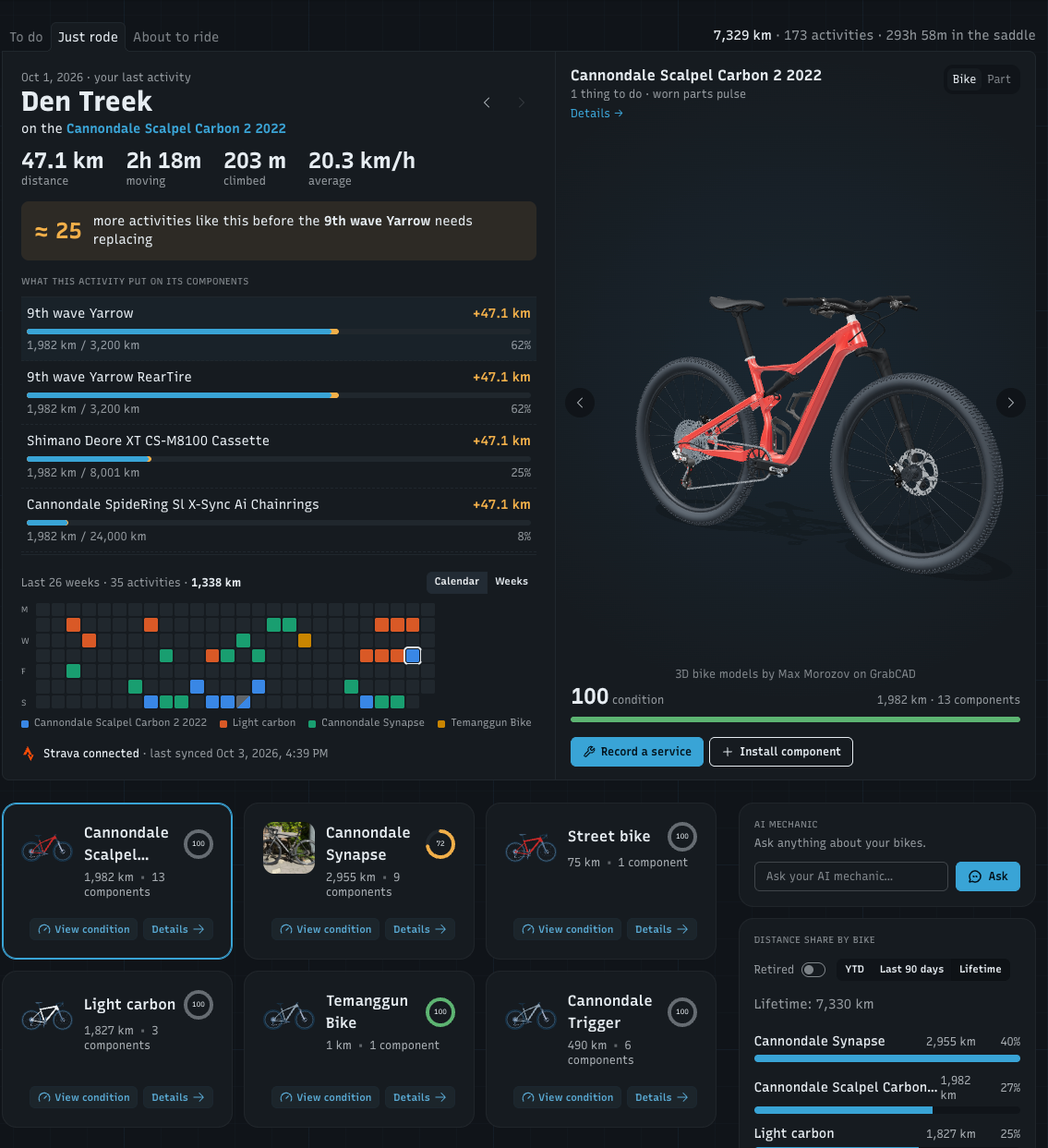
Most people open WatchMy.bike to check one bike and how worn its components are. The old home page made you click through for that, so I rebuilt it around that question. The top of the page now has one card with three tabs, one for each reason to open the app, and a 3D view of the bike or component you're looking at.
To do
Everything that needs work, grouped by bike: components with Replacement due or Replacement due soon, and anything with Service due, including bike-level services. Tap a row to see that component in 3D; Condition → opens its Condition tab. View all → takes you to the Condition page.
Just rode
Your last activity, with its distance, moving time, climbing and average speed, and:
≈ how many more activities like this before the first component on that bike needs replacing
what this activity put on each component, with each one's wear before and after
‹ › to browse back through the last 26 weeks of activities, older ones included with their wear on that day
a Calendar coloured by bike (two bikes on one day split the square) or a Weeks chart with your distance per week. Click a day to open that activity
When an activity arrived in the last 12 hours, the page opens on Just rode.
About to ride
Pick a bike and get a verdict: Good to go. or Ride, then fix., with the closest-to-worn component. Below it: your tyre pressure front and rear in bar and psi (from the tyre pressure tool), and every installed component with its wear, in a list that scrolls.
The 3D view
Next to the tabs, your bike stands in 3D:
Bike: your bike's 3D model, where worn components pulse
Part: the selected component on its own in 3D. A chain shows up in its Chain Games design
‹ › (or the ← → keys) step through your garage on the Bike tab, or through the bike's components on the Part tab
Details → opens the bike or component, and the buttons below go straight to Record a service, Install component, or a component's History
Picking a component anywhere puts its bike in the 3D view, so the tabs, the 3D view and your garage cards always show the same bike.
The rest of the page
Your garage: tap a bike card to put that bike in the 3D view. Up to two rows on a computer (scroll sideways for more), one swipeable row on your phone
Ask the AI mechanic and your distance share by bike sit next to it
Recent activities and From the blog are now compact lists
A Strava line at the bottom of the card shows when your activities last synced
What moved
The Needs attention card is now the To do tab. The quick actions are now the buttons under the 3D view and in the ⋮ menu at the top of the page. Your totals (distance, activities, time in the saddle) are one line above the card.
Your data hasn't changed: it's the same tracking from your Strava activities, laid out around the questions you open the app with. If something you used is harder to find now, tell me here.
New: specs for your components
Which rotor size was it again? Which freehub body does the cassette need? A component can now hold its exact specs, so you know which spare or replacement to order, also from a hotel room halfway through a bike trip. It's optional and a few fields per type:
Cassette: speeds, range (e.g. 10-51) and freehub body
Chainrings: teeth, mount, BCD and offset
Crankset: crank length and spindle
Chain: speeds and quick link
Bottom bracket: shell and spindle
Brake rotor: diameter and mount (Centerlock or 6-bolt)
Brake: brake type
Tyre: width, wheel size, setup (butyl, latex or TPU tube, or tubeless) and insert
Wheel: wheel size, inner rim width, rim depth and hub spacing
Rear hub: freehub body and engagement points (POE)
Spokes: spoke type, length left and right, and spoke count
Bearing: size, seal and material
Stem: length and angle · Handlebar: width · Seatpost: diameter and length
Thru axle: length, diameter and thread pitch
Fork: steerer, axle and max tyre clearance
You'll find them in the Specs section when you add or edit a component. When you pick a model from the catalog while typing the name, the specs it knows (like a cassette's speeds and range) fill in for you; anything you already typed stays as it is. Filled-in specs show on the component's page and, if you share your bike, on its public page too, because the gearing is exactly what people ask about. Sizes are in mm.