Add a bike with all its components in a few taps
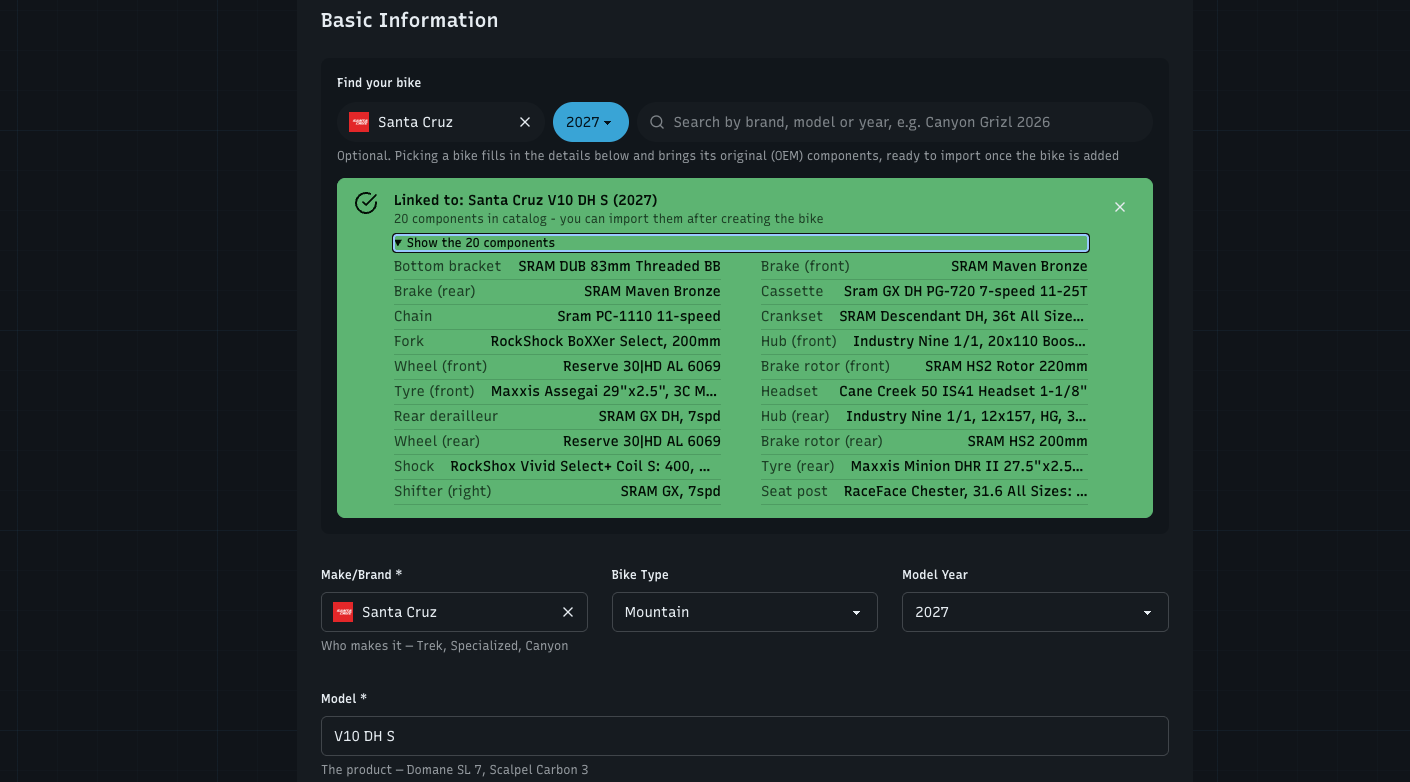
Adding a bike used to stop at the bike: its components were a separate job, and that's where many bikes stayed empty. This week the catalogue behind WatchMy.bike got a lot bigger, and adding a bike or a component now starts with finding it there. Pick your bike, and its original components come with it.
A bigger catalogue
I now read manufacturers' own sites into the catalogue, so it has current models and their stock builds:
Bikes: Canyon, Giant, Cannondale, Cube, Santa Cruz and Specialized, each with its original components
Components: Shimano, and SRAM with Zipp, Truvativ, Quarq and RockShox (except its forks and shocks, which the catalogue already had), with their specs (speeds, gearing, rotor size and the like)
Find your bike
On Add bike, start with Find your bike: search by brand, model or year (e.g. Canyon Grizl 2026), or narrow it with the brand and year filters. Picking a bike fills in the brand, model, year and type, and shows its original components in a list, so you can check it's your build.
At the bottom, Install its components now adds them all as original (OEM) components installed from your purchase date, in the same step as the bike. Leave it off to pick which ones to import after adding the bike.
Your Strava bike, matched
Adding a bike from your Strava gear? Strava only knows its name, like "Scalpel". WatchMy.bike now shows Is it one of these? with the catalogue bikes that match, closest year first, and the ones other riders picked marked Most picked. One tap picks it; None of these if it isn't there.
Find your part
Adding a component works the same way: Find your part searches the component catalogue by name, model or type (e.g. XT rear derailleur), with a brand filter. A pick fills in the brand, name, type, model and the specs it knows.
Search everything with ⌘K
The search at the top (⌘K, or Ctrl K) now finds your own bikes and components and the catalogue's, in sections: Your bikes, Your components, then the catalogue. Add on a catalogue result opens the add form already filled in. The All / Bikes / Components chips narrow it down.
Import from a product page link
In Import components, pick Product page link or spec text, paste the link to your bike's page on the manufacturer's site and press Read page. WatchMy.bike reads the page and its specifications (this can take up to a minute) and shows the components it found. For the best results:
Use the manufacturer's page for your exact build and year, not the page for the whole model family
Use a page that lists the full specification, usually under "Specs" or "Specifications"
Cannondale, Specialized, Giant, Canyon and Trek pages work well. Scott, Orbea and 99spokes block automatic reading: the importer tells you, and you copy the specifications from the page and paste them instead
Bike no longer on the brand's site? A shop or review page with the full component list often works too
When you confirm an import from a link, that link also goes on a list for the catalogue: I check the page and add the bike to the catalogue for the next rider. Only the link is used, nothing you changed in your import. Once it's in, your bike gets linked to it.
Step by step: Bulk import components.
A clearer import review
The review step is now a list you can scan like a spec sheet: one row per component with its type icon, brand and model, grouped by category, with a checkbox to include or skip a whole group. Under the model you see the line it came from, so you can check it against the page.
Matched to the catalogue: imported lists (from Strava, a link, pasted text or a spreadsheet) are looked up in the catalogue as soon as you reach the review. Clear matches get linked right away (📖); when there's more than one candidate you get Is it …? Use this, for the right side too (a rear brake gets the rear caliper)
Search per component: click a row to edit it. Find your part is right there, filtered to that component's type, and shows which catalogue part it's linked to
Rows the parser wasn't sure about open by themselves, with a yellow tint
Linked components get the catalogue's full name and specs when you import
Bikes you added from the catalogue now show their original components right under the bike you pick, with Import Catalog Components next to them. And every step of the import has the same bar at the bottom as the other forms.
Fixed
Deleting a bike asks what happens to its installed components: Keep them in storage (with their distance, ready to install on another bike) or Delete them too. Before, kept components lost the distance they'd done on that bike.
Front and rear: a catalogue bike that lists its tyres, brake rotors or pads without saying front or rear imported two front ones. The second one is now the rear one. If an earlier import gave you two "front" ones, change the type of one of them.
If your bike isn't in the catalogue yet, or something got matched wrong, tell me here.