Batteries, one-tap service reminders, and Activities on every bike and component
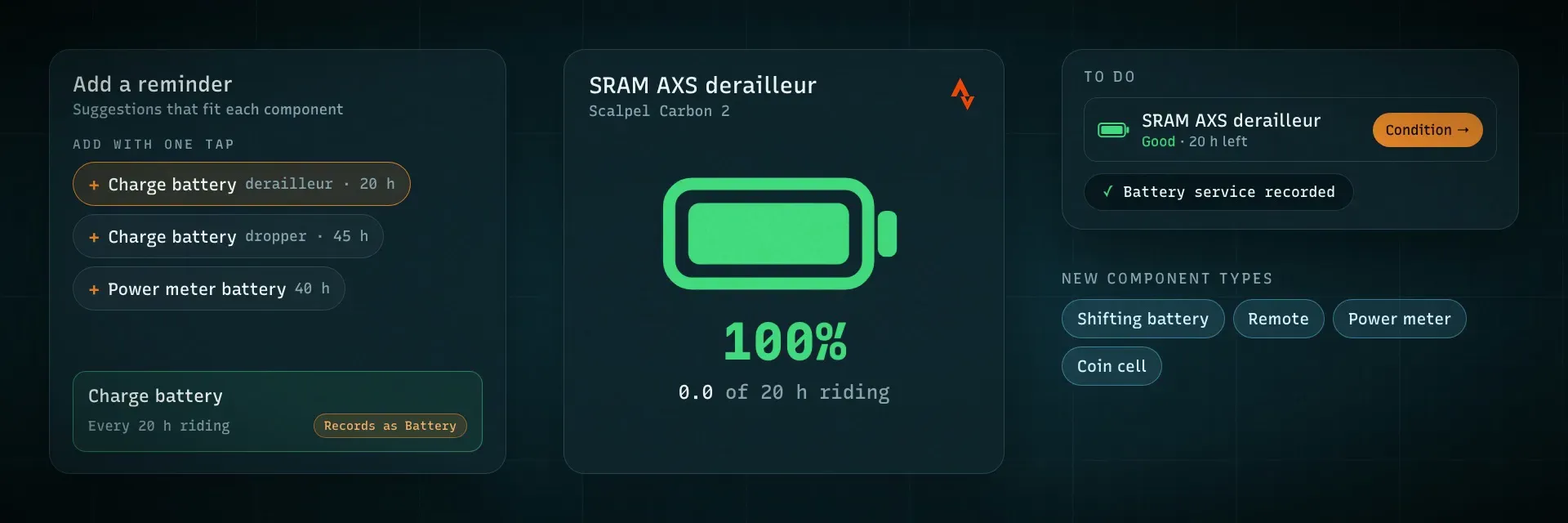
More and more of a bike runs on a battery: electronic shifting, a wireless dropper, power meter pedals, the remote on the bar. Until now WatchMy.bike only knew the e-bike battery. Now every battery can be tracked, setting up a service reminder takes one tap, and the Activities tab of a bike or component looks and works like the Activities page. A lot of this started with an email from a rider who asked for exactly these things: thank you!
Track every battery on your bike
Battery is a new service type on any component. Log a charge, or a new coin cell, with Record Service → Battery
After two charges you see how many times you've charged it and how long the last charge lasted, in km and riding hours
A battery icon next to the wear ring shows roughly how much charge is left, on the component cards and the component's Overview
When it needs charging, it shows as Charge due in your dashboard's To do, and on the Condition page with a battery icon and a Charge badge
About to ride on the dashboard lists your bike's batteries, emptiest first
Two new component types: Shifting Battery (Drivetrain), for a removable Di2 or AXS battery you move between parts, and Remote (Cockpit), for dropper remotes, lockouts and AXS Pods
How it works, step by step: https://watchmy.bike/help/maintenance/track-batteries
Service reminders with one tap
Every component and bike now shows Add with one tap suggestions in its Service Intervals: for example Chain wax / lube every 300 km and Check chain wear every 1,000 km on a chain, Lower leg service every 50 h and Damper service every 125 h on a fork, Dropper service every 200 h, Brake bleed and Full bike service every 12 months on a bike. One tap creates it, tracking from today
Battery suggestions too: Charge battery every 20 h on an AXS derailleur and 45 h on a dropper, Power meter battery every 40 h, Replace coin cell every 18 months. They sit a little before the maker's number on purpose: a charge too early costs nothing, an empty battery mid-ride costs you your gears
The values come from the manufacturers (RockShox, Fox, SRAM, Favero, Garmin) and from my parts lifespan guide. Every number stays editable
Just added a component? It asks Set up reminders? with the ones that fit already ticked. Untick what you don't want, or Skip
Add Interval shows the same Suggestions at the top of the form, so a tap fills in the name, the interval and what it records as
An interval remembers what kind of service it is
The interval form has a new Records as setting. A Charge battery reminder records as Battery, a chain lube one as Lubrication, so Record Service on that reminder already has the right type selected. Suggestions set it for you.
Lubrication, and name your own service
Lubrication is its own service type now, next to Cleaning
Pick Custom in Record Service and type what you did ("Replaced cleat bolts"). That name shows in your service history instead of "Custom". A reminder that records as Custom fills in its own name
Utilities → Record Service: after Just log a service you can tap what you did ("Or pick what you did:"), so a lower leg service or a charge gets its own type and reminder
Activities on every bike and component
The Activities tab of a bike and of a component now works like the Activities page: one year at a time, the calendar and weeks chart, and the activity details next to the list, with Outdoor / Indoor
On a component you only see the activities that counted for it. Where a wear rule counted less, the row says how much it counted. When a component was on more than one bike, you can filter by bike, and opening an activity highlights the component in its list
The totals on both tabs are a compact row now, so on a phone you get to the activities straight away
On the Activities page itself you can Search titles (handy for your #tags) and filter by ride type: Road, MTB, Gravel, E-bike or E-MTB
Smaller things
On a phone, the Service Intervals header no longer cuts off Add Interval
Questions or ideas about any of this? Let me know, I read everything.