Choose which activities wear each component
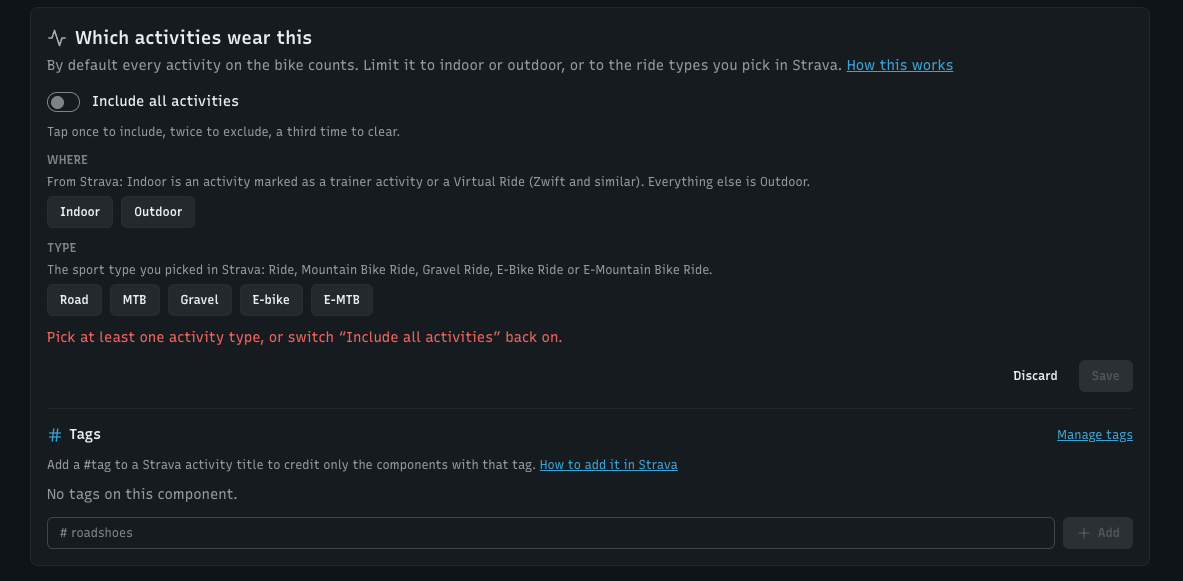
A user wrote in with six pairs of cycling shoes: two for the road, four for MTB and gravel. Every pair was getting the same distance, because until now every component on a bike counted every activity on that bike. That's right for a chain. It's wrong for shoes, trainer wheels or winter tyres. Now you can tell each component which activities are its own.
Ride types, from what Strava already knows. On a component's page there's a new Which activities wear this card. Switch off Include all activities and pick chips: Indoor or Outdoor, and Road, MTB, Gravel, E-bike or E-MTB. Tap once to include, twice to exclude. Trainer wheels become Indoor, gravel tyres Gravel. It uses Strava's trainer flag and the sport type you already pick, so there's nothing to type per activity. A component on more than one bike gets a rule per bike.
Tags, for the choices Strava can't know. Which pair of shoes, which set of seasonal parts. Make tags under Components → Edit tags, put them on components, and add the tag as a hashtag to the Strava activity title: Sunday loop #roadshoes. Only the components with that tag get the activity.
Groups keep tags from getting in each other's way. Put roadshoes and mtbshoes in a Shoes group and winter and summer in a Season group. #roadshoes then picks the right shoes without touching your winter parts. #roadshoes #winter picks both. Components without tags, like your chain, always count.
Forgetting the hashtag changes nothing. An activity with none of your tags counts for everything, exactly as before. A tag only ever narrows things down. Nothing silently stops counting.
The whole history is recalculated. Saving a rule or a tag goes back over every past activity, service intervals included, and shows you the before and after ("2,882 km → 20 km"). Adding a hashtag to last month's activity in Strava moves its distance to the right component on the next sync.
See why an activity counted. Activity lists now show each activity's type the way these rules read it: Outdoor · MTB, Indoor, Commute. If an MTB activity shows Road, it's saved as a plain Ride in Strava, and that's the thing to fix there.
WatchMy.bike only reads your activity titles and sport types. It never writes anything to Strava, so there are no new permissions to approve. If you connect an AI assistant through MCP, it can set rules and tags for you too.
The full guide, including where to edit a title in the Strava app and on the website: Choose which activities wear a component