New ways to add a bike and components, and a page for every component in the catalogue
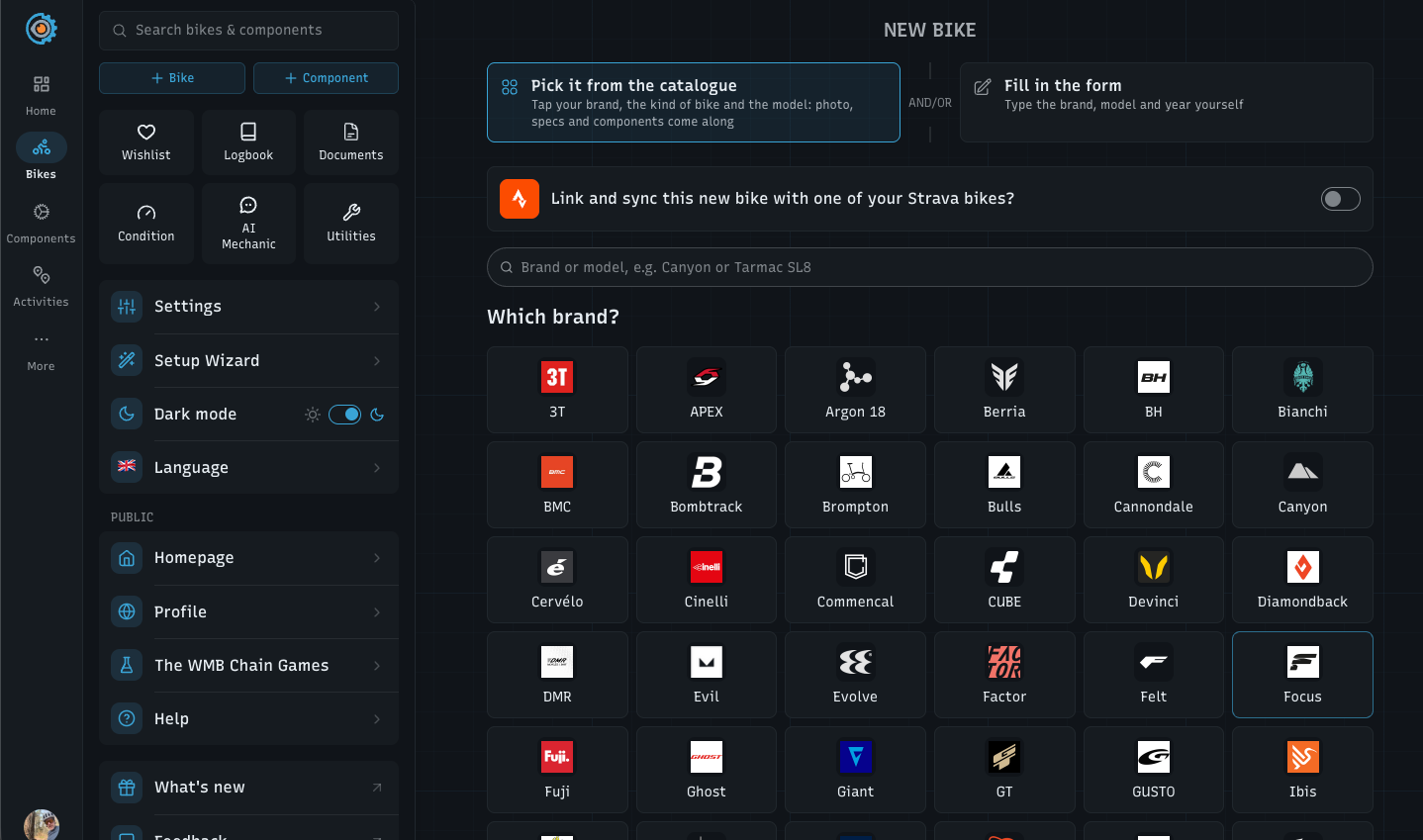
Adding a bike used to mean filling in a form, and adding components one form at a time. Most bikes are already in the catalogue with their original components, so I made it possible to tap your way there instead. Adding a component now asks one question at a time, or takes a whole list in one go. And the components in the catalogue have their own pages now, linked from every catalogue bike: how often to service them, the maker's specs, what they work with and which bikes come with them.
Add a bike: pick it from the catalogue, or fill in the form
+ Bike opens with a switch at the top: Pick it from the catalogue and/or Fill in the form. The two work together: a bike you pick fills in the form, and switching back and forth keeps what you typed.
Pick it from the catalogue: tap your brand, then What kind of bike?, Which model? and Which one is yours? The photo, specs and components come along
Search on every step. Type a brand or a model (e.g. Canyon or Tarmac SL8) to jump straight to it
Your Strava bikes come first. Switch on Link and sync this new bike with one of your Strava bikes? and pick one: its Strava distance and every new activity count towards the new bike. A Strava bike opens on its model family in the catalogue. Not in the catalogue? You can still create it yourself, and it stays linked to that Strava bike
Not here? Fill in the form and type the brand, model and year yourself
Install its N components now is on for a catalogue bike: its original components go on from the purchase date in the same save. Switch it off to pick them afterwards
No Strava yet? After you add a bike, its page offers to connect Strava, so every activity adds to its components' distance
Add components: one at a time, or several at once
+ Component opens a new page with two ways in.
One at a time is for a new chain or a pair of tyres. One question per screen, and the questions that don't apply are skipped:
Which bike is it for? Or A spare for storage, the Wishlist, or Already retired for the history
What is it?, then Which one?: from your spares, Same as the current one (copies its service reminders), a model from the catalogue (fills in its specs), one you type yourself, or Skip for now
Front, rear or both? for tyres, wheels, hubs, brakes, brake pads and rotors. Both adds two, so each one wears on its own
When was it installed? Today, Yesterday, Another day, or It came with the bike (it counts the bike's whole distance)
New or used? A used one starts with the distance it already has
What happens to the old one? Worn out, retire it, Keep it as a spare, or It stays on the bike too
Check and add shows everything on one card. Change any answer, or add price, purchase date, weight, serial and notes
Several at once is for a whole build. Give it a list in any form and I'll recognise the components:
Paste one per line, in any format: Chain: Shimano CN-HG701, GP5000 front and rear
Product link: paste the bike's specifications page (the brand's site or a shop) and I read the components from it
CSV, or your Strava gear, with the install dates Strava has
The catalogue build: when your bike is in the catalogue, Use them adds the components it came with
Each line becomes a row you can check and change. Lines I can't place, Let AI read it
One Installed on date for the whole list (the bike's first activity, today or another date), unless a row has its own. Mark them as original components, or retire the components they replace
How it works: https://watchmy.bike/help/components/add-component and https://watchmy.bike/help/components/bulk-import-components
A page for every component in the catalogue
The catalogue now has a Components section next to the bikes: https://watchmy.bike/catalog/components. Forks, shocks, derailleurs, shifters, cassettes, chains, cranksets, bottom brackets, brakes, rotors, seat posts and tyres, each with its own page. Search for any component there.
Wear and service: its typical lifespan and the usual service intervals. For electronic components, when WatchMy.bike reminds you to charge it
Specs: the key specs, and every spec as the maker lists it on its website
Works with: components of the same brand, with the same number of speeds, that it's usually fitted with
Other components of the same series, e.g. the rest of the Ultegra group
Comes on N bikes in the catalogue, with links to each
Need a new one? Search Google Shopping and five shops for it
Track this component adds it to your bike with its specs filled in
On every catalogue bike page, its components link to their pages where the catalogue has one, and Want to buy one? searches for the bike online.
On your own components
About this component on a component's Overview: when it's in the catalogue, its key specs, what it works with, the rest of its series and how many bikes come with it, with a link to its page. Not linked yet? Search the catalogue right there. Picked the wrong one? Not this component? undoes the link
Find it online in a component's Details: search Google Shopping, bike-components, Bike-Discount, BIKE24, FuturumShop or Mantel for a replacement
Smaller things
A new menu on a Desktop/Laptop (largeScreen). The sidebar is now a narrow bar on the left with the same items as the bar on your phone: Home, Bikes, Components, Activities and More. More (or your photo at the bottom) opens a panel beside it with search, + Bike, + Component, the other pages, Settings, the light/dark switch, your language and who's signed in. On a settings page it opens on the list of settings
Typed-in and autofilled fields keep the theme's colours