Wishlist: compare bikes side by side, and a page for every catalogue bike
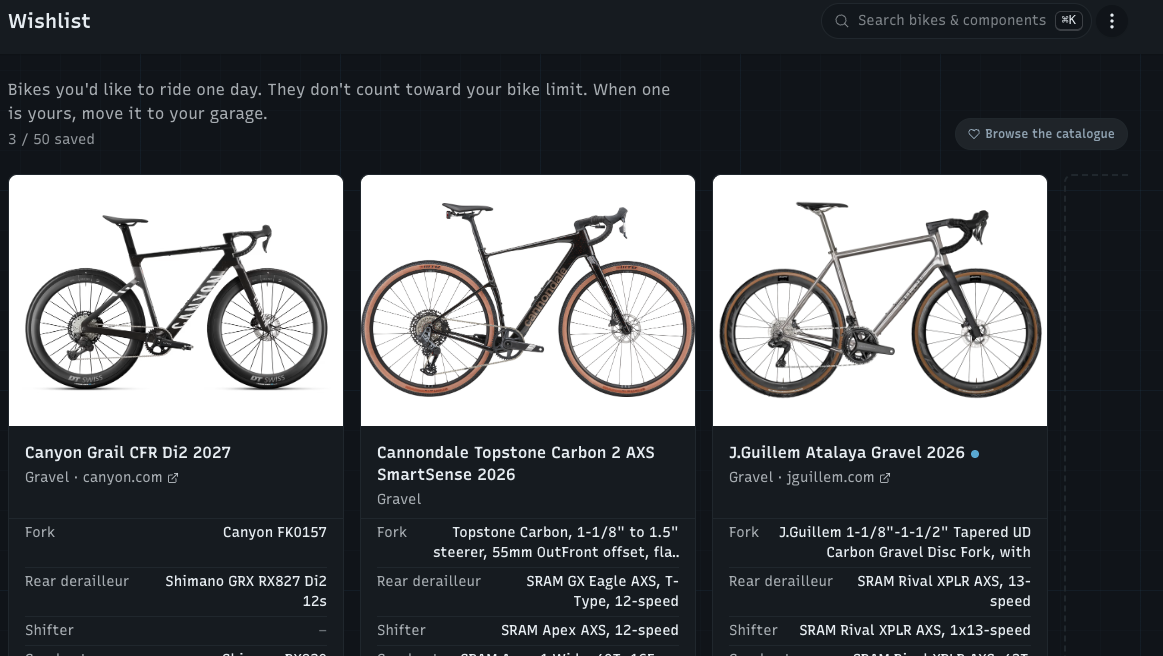
Choosing your next bike mostly comes down to the components: which one has the better brakes, the wider range, the nicer wheels. So the wishlist is now its own page that lines those up for you, and the catalogue behind it got a public page for every bike I read from the makers' sites.
The wishlist is its own list
Wishlist has its own place in the sidebar: https://watchmy.bike/wishlist
Tap ♡ (or Add to wishlist) on any bike in the catalogue to save it. Up to 50 bikes, and they don't count toward your bike limit
A bike that isn't in the catalogue? Add a bike that isn't in the catalogue: brand and model are enough, and you can paste a spec or the shop's link
Add a note and a target price, change the order, and when one becomes yours: Move to my garage
Bikes you had marked as "wishlist" before are already on the new list
Compare side by side
Every saved bike is a card with its photo and its original components, and the same component type sits on the same line in every card. Swipe or scroll sideways through your bikes (about one card in view on a phone, two or three on a bigger screen) and the bike names stay at the top while you scroll down the components. Each card links to the bike's page on the maker's or shop's site.
No account needed
You can save and compare bikes without signing up: they're kept in your browser at https://watchmy.bike/catalog/wishlist. Create a free account and they move into it, so you have them on every device and can add notes and target prices.
A page for every bike in the catalogue
Bikes I read from the makers' own sites now have their own page, with the maker's photo and the full list of original components, the spec the bike left the factory with. Open one from View full details in the catalogue, or find it through Google. Each page shows:
The brand's logo, colour and a short About section
Other builds of the same model, or the brand's other bikes
Add to your garage, which installs all its original components in one go, and Add to wishlist
A better catalogue to browse
With nothing searched, https://watchmy.bike/catalog/bikes now shows a mix of bikes with a full page, different every day. Search or filter to get the whole catalogue
Brand logos on the cards, in the table and in the bike window
Bikes whose model year isn't certain show a small dot with the year they were added to the catalogue
Cleaned up: catalogue bikes that only had placeholder components no longer turn up in search or Strava matching, and placeholders read honestly (like "Pedals, model not listed")
On phones the filters sit two by two, so the brand box has room
On iPhone, the component list on the wishlist no longer slides over the bike's photo
New on the blog
What components came on my bike? How to find a bike's original spec, and why it's worth checking before you buy second-hand: https://watchmy.bike/blog/how-to-find-your-bikes-original-spec
Missing a bike or a brand in the catalogue? Tell me here and I'll look at adding it.