Your activities by year, with the route and what each one wore
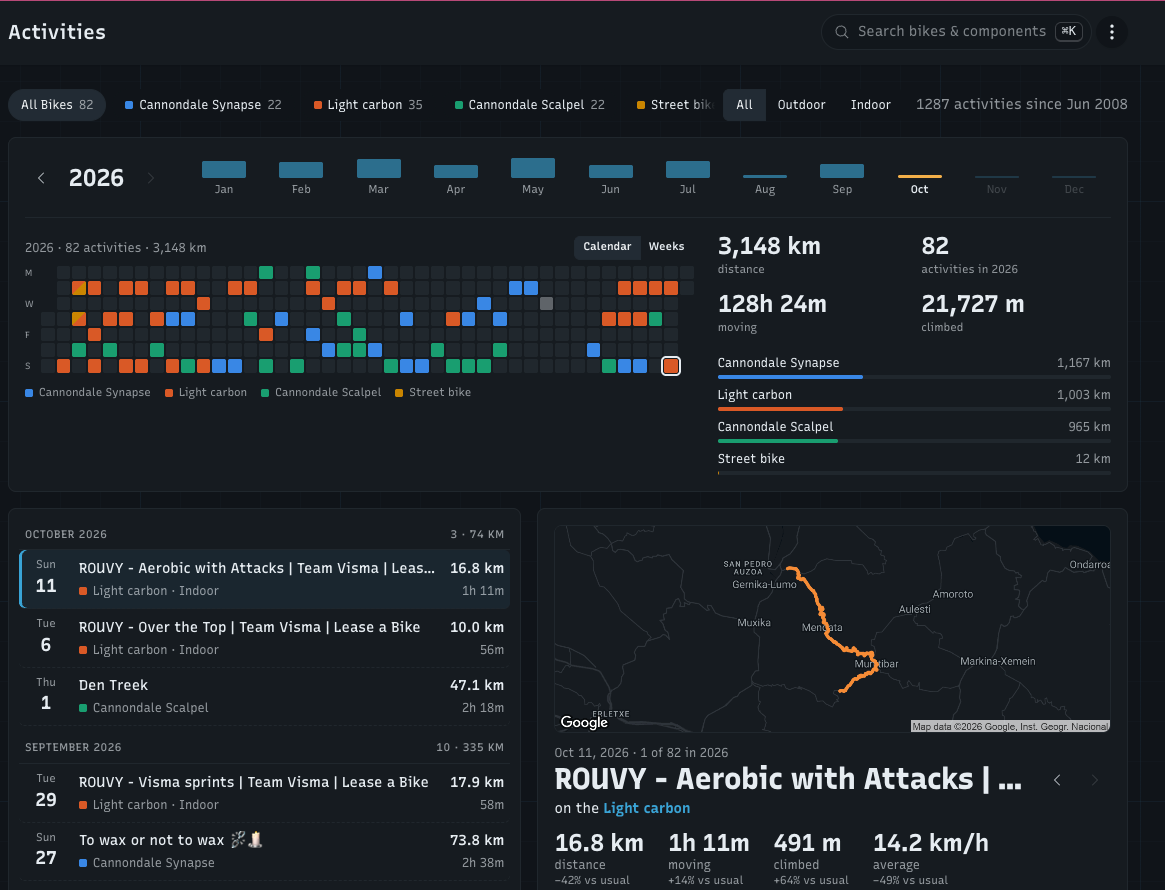
The Activities page used to be a long list in numbered pages. It now works the way you look back on riding: one year at a time, with the activity you pick open next to the list, its route on a map, and what it did to your components. And your Strava tags now count in wear rules.
One year on one page
‹ › next to the year steps through your years; the month strip jumps to a month
A calendar coloured by bike, or weeks with your distance stacked per bike, and the year's totals
Filters on one row: pick a bike or an activity type to narrow the year
The list below runs by month. Click an activity to open it in the detail pane; ‹ › or the ← → keys walk through the activities, into the previous or next year when you reach the edge
The year, the open activity and your filters live in the address, so a reload or a shared link opens the same view.
The detail pane: the activity and its wear
Picking an activity shows the same "Just rode" view as the dashboard: distance, moving time, climbing and speed, how it compares to your usual, and what this activity put on each component that was on the bike that day, with its wear before and after. Older activities use the components that were installed at the time.
The bike name links to the bike, and three labelled buttons do the rest: Strava opens it on Strava, Refresh fetches it again, Delete removes it from your stats.
The "≈ activities like this left" countdown now skips components that were already past their lifespan, so it counts down to the next one that still has life left instead of reading 0. Only when every tracked component is past it, a red box says how far over the worst one is.
Route maps
Outdoor activities with a GPS route show their route on a map: in the detail pane on the Activities page, and on the dashboard's Just rode tab, where the map takes the place of the 3D view. The map follows the theme you picked, light or dark. Indoor activities keep the 3D bike.
Everything opens in one place
On the dashboard, View all → next to the date in Just rode opens the Activities page on that same activity
On a bike's or component's Activities tab, clicking an activity opens it on the Activities page, with ‹ › stepping through that bike's activities
On Just rode, picking a bike in your garage switches to About to ride with that bike
About to ride: services and wear rings
Every component shows its wear ring (the same one as on the component cards) and what's left: about how many km, how far over, or Service due
A new Services block lists the bike's services that are due or due soon, with when (in km, riding hours or a date) and a link to each. The rest is counted, like "3 services on track"
A due service changes the verdict: Good to go. becomes Ride, then service.
Strava's Race, Workout and Commute tags
When you mark an activity in Strava as a Race, a Workout or a Commute, WatchMy.bike now reads that too. In a component's Tags section, From Strava: adds #race, #workout or #commute, shown as "from Strava". They match the activities Strava marked that way, as if the title had the hashtag, so they combine with your own tags. Strava doesn't share its other activity tags.
Example: race wheels count #race only; training wheels skip #race.
The first time you save a Race or Workout rule, I fetch those tags for your older activities from Strava once, so they count too. The card says so; the distance updates within a few minutes.
Skip a tag, or only count tagged activities
Tag chips on a component now cycle like the activity type chips: tap once to include, twice to exclude (struck through), a third time to remove. And a new switch, Only count activities with these tags, makes a component wear only on activities with one of its included tags, for things you use now and then, like race wheels. The rules show as badges on the component cards, in the table and on the component's page.
How it works step by step: Which activities wear a component.
Indoor activities
A bike's Indoor activity wear setting (count fully, skip, or count at a reduced rate) now also shows on each component's activity rule, so you can see why a component's wear only grows on outdoor activities, or by which share indoor ones count.
All of it runs on the activities you already log on Strava. If something reads wrong, tell me here.