Your bike in 3D, in its own colour
Categories: New, Improved, Fixed Date: 3 October 2026
Until this week, a bike page showed its components on a flat line drawing. It did the job, but it never looked like your bike. So I spent the past days building a 3D view, and polishing a lot of small things around it.
The 3D bike
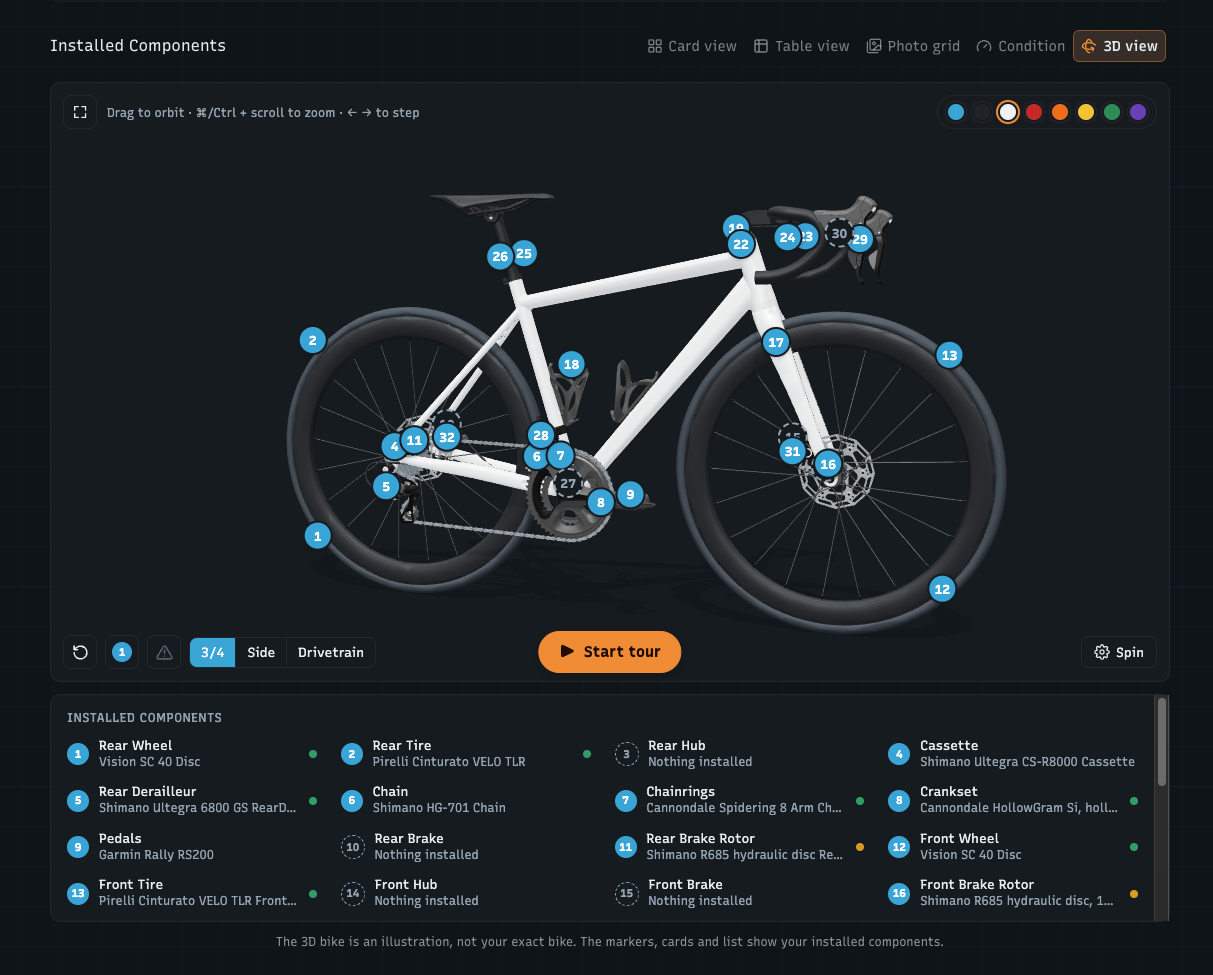
Open a road, gravel or mountain bike and pick 3D view on the Components tab. Your installed components sit on a 3D bike as markers: tap one to open its card, or press Start tour to walk through them. A few things you can do there:
Ride: the cranks, chain and wheels turn at a cadence you choose (20–120 rpm)
Camera presets for ¾, side and a close-up of the drivetrain, plus fullscreen
Worn parts glow in their warning colour (amber or red) right on the bike, so you see what needs attention without reading a table. You can switch the glow off.
Indoor bikes stand on a Zwift Hub, with the flywheel turning along with the cassette, and road bikes get clip-in pedals
On phones the controls fit in a single row and the component card slides up from the bottom. Other bike types keep the 2D diagram for now. The 3D bike is an illustration, not a scan of your exact frame.
Frame colour and material
Bikes have two new fields: frame colour (preset swatches or your own colour) and frame material (carbon, aluminium, steel, titanium, bamboo). Set the colour in the bike form or straight from the swatches in the 3D view. The 3D bike opens in it, and so do all the bike drawings across the app: your garage, the bike cards, the bike page header and public bike pages.
The logo comes to life
The WatchMy.bike logo is now the loading indicator. While a page loads, its chainring, eye and pupil fly apart and snap back together, in the top bar on your phone and the sidebar on desktop. Save a bike or a component and a short celebration plays: the chain wraps a chainring when you add a bike, a cassette drops in for a new component, and edits get a quieter version. New activities from Strava arrive with the chain running and the kilometres counting up.
Saving works the same everywhere
Settings, account, and the bike and component forms now share one sticky save bar. It shows up as soon as you change something, says how many changes you have, and lets you save or discard them in one go. Typing a name or brand now registers right away, and the cursor no longer jumps to the end when you edit in the middle of a word.
Faster
The Components tab of a well-stocked bike was slow: for a bike with 30 components it took over 4-6 seconds. It now loads in under a second. The "Previously installed" list at the bottom loads only when you open it.
Fixes
Sync Last 30 Days in the Strava settings now really goes back 30 days. Before, it only looked for activities since your last sync.
The Condition view is remembered when you come back to a page.
As always, if something looks off or you're missing a part on the 3D bike, let me know.